
Hospitals and clinics run on technology that rarely gets to rest. Electronic health records, imaging systems, lab analyzers, infusion pumps, and scheduling tools all depend on an IT backbone that has to stay available at every hour of the day. When something fails, the cost is not measured only in lost productivity. It can reach the bedside. That is why IT service management, usually shortened to ITSM, has quietly become one of the most consequential operational disciplines in modern care delivery.
This guide examines what separates the best ITSM solutions for healthcare from generic help desk software, the capabilities that matter most in a clinical setting, and a practical method for evaluating vendors before you commit to a platform you will likely keep for years.
Why ITSM carries higher stakes in healthcare
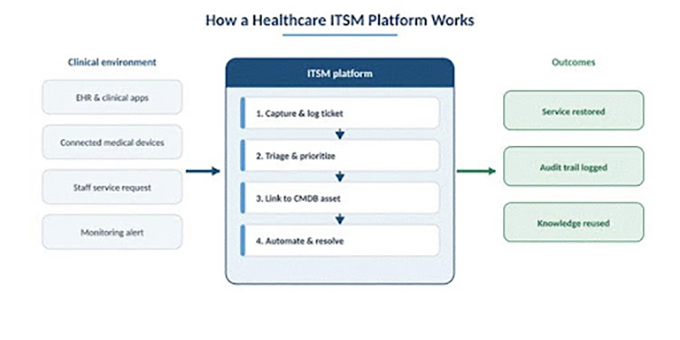
IT service management is the structured practice of planning, delivering, and supporting IT services. It covers familiar processes such as incident management, service requests, change management, problem management, and IT asset management, all supported by self-service and reporting. In most industries a slow ticket queue is an inconvenience. In a hospital, a delayed response to an EHR outage or a frozen patient monitor can interrupt treatment and add to the load on clinicians who are already stretched.
The pressure is well documented. A widely cited McKinsey survey found that roughly a third of clinicians have considered leaving direct patient care, in part because of time lost to administrative tasks and system friction. Deloitte research suggests most health technology leaders still describe their organizations as only midway through digital transformation, even as nearly all of them name patient experience as the primary goal of those efforts. A capable healthcare ITSM platform sits directly on that fault line, because it determines how quickly a nurse, physician, or administrator gets help when a tool they depend on stops working.
What makes healthcare ITSM different
A service desk built for a software company will not automatically suit a health system. Four characteristics set the sector apart and should shape any shortlist of IT service management software for healthcare.
Compliance and data protection are not optional
Patient records are among the most regulated and most targeted data in any industry. An ITSM tool used in healthcare touches tickets, asset records, and workflows that may reference protected health information, so the platform itself has to support strong controls: role based access, encryption, detailed audit trails, and the ability to produce evidence that maps to specific safeguards. In the United States, HIPAA sets the legal baseline, while frameworks such as HITRUST and the HHS 405(d) performance goals describe how to demonstrate maturity. The updated HIPAA Security Rule taking effect in 2026 raises expectations further, with stronger requirements around multifactor authentication, encryption, and faster breach reporting. Outside the US, GDPR and national rules apply similar logic. The takeaway is simple: a healthcare ITSM solution should make audits easier, not harder.
Clinical systems cannot simply go dark
Downtime in healthcare is a patient safety question, not a productivity metric. Industry analyses now put the average cost of a healthcare data breach above ten million dollars, with incidents that often take the better part of a year to fully contain. Beyond security events, routine outages cause canceled procedures, delayed lab results, and diverted emergency care. This is where disciplined change management and problem management earn their keep. Structured change processes reduce the chance that a scheduled update knocks a clinical application offline, while problem management addresses root causes so the same incident does not return week after week.
Connected medical devices turn asset management into a safety task
The Internet of Medical Things has redefined what asset management means in a hospital. Connected equipment, from infusion pumps and patient monitors to imaging systems, now accounts for a large share of devices on a clinical network. Research across millions of these devices has found that nearly every healthcare organization operates at least one device carrying a known, exploitable vulnerability, and a striking proportion of medical equipment is past end of life with no patches available. You cannot protect or maintain what you cannot see. A healthcare ITSM and asset management platform that keeps an accurate, continuously updated inventory, ideally discovered without installing software agents on devices that cannot accept them, becomes part of the safety and security posture rather than a back office record.
Everything has to connect to the EHR
Healthcare IT is a web of interdependent systems. An ITSM tool that lives in isolation creates duplicate work and blind spots. The better solutions integrate with electronic health record platforms such as Epic and Cerner, along with lab systems, imaging archives, identity providers, and communication tools, so that an alert in one system can open or enrich a ticket in another. Integration is what turns a ticketing system into an operational nerve center.
Core capabilities the best healthcare ITSM tools share
Regardless of vendor, a short list of capabilities tends to separate strong platforms from weak ones in a clinical environment. The table below summarizes what to verify during any evaluation.
| Capability | Why it matters in healthcare |
| Incident and problem management | Restores clinical services fast and stops recurring failures that disrupt care. |
| Change and configuration management | Prevents updates and maintenance from causing unplanned outages. |
| IT asset management and CMDB | Tracks devices, software, contracts, and dependencies, including connected medical equipment. |
| Self-service portal and knowledge base | Lets staff resolve common issues alone, cutting ticket volume during busy shifts. |
| Workflow automation | Routes requests, triggers approvals, and removes repetitive manual steps. |
| Security and compliance controls | Supports role based access, encryption, and audit logging for HIPAA and similar rules. |
| Reporting and SLA tracking | Measures resolution times and service levels so leaders can prove and improve performance. |
| Integration and open APIs | Connects the ITSM platform to EHR, identity, and clinical systems for a unified view. |
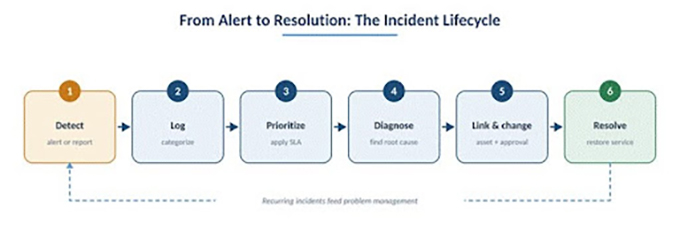
Those capabilities are not isolated features. They work together along a single path that every issue follows, from the moment it is detected to the moment service is restored and the lesson is captured.
How different categories of ITSM solutions fit healthcare
There is no single best tool for every provider. It helps to think in categories, because budget, IT maturity, and the size of the estate point different organizations toward different platforms.
Enterprise platforms
Large, multi hospital systems often gravitate toward broad enterprise suites that reach well beyond IT into HR, facilities, and clinical operations. These platforms offer deep automation, growing layers of artificial intelligence for triage and prediction, and the scale to serve tens of thousands of users. The tradeoff is cost and complexity. They typically require dedicated administrators and a longer implementation, which can be justified at scale but feels heavy for a regional hospital or a fast growing telehealth provider.
Mid market platforms that unify service and asset management
A large segment of healthcare providers, including community hospitals, clinics, and specialty groups, needs robust ITIL aligned processes without the overhead of an enterprise rollout. Here the most useful pattern is a single platform that combines IT service management, IT asset management, and network inventory rather than three tools stitched together. When tickets, assets, users, and contracts live in one relational data model, an incident can be linked directly to the device that caused it, and a change can be assessed against everything it touches.
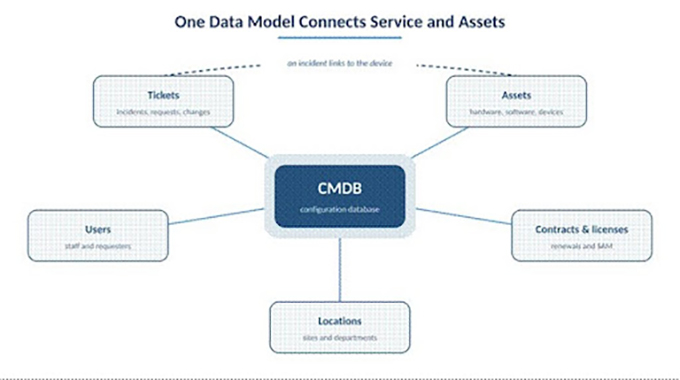
Alloy Software illustrates this approach. Its Alloy Navigator product brings ITIL processes such as incident, problem, change, and request fulfillment together with asset lifecycle tracking, a configuration management database, and agentless network discovery in one system, available in the cloud or on premises. For a hospital trying to gain visibility into a sprawling fleet of workstations and connected equipment, the value is less about any single feature and more about the absence of an integration tax, since the service desk and the asset inventory share the same foundation. The relationship between an outage and the hardware behind it stays explicit instead of being reconstructed by hand. The company also publishes HIPAA and GDPR oriented material, a reminder that compliance fit should be confirmed during evaluation rather than assumed.
Experience focused and AI assisted platforms
A third category prioritizes ease of use and end user experience, with clean self-service portals and AI powered chatbots that deflect routine questions. These tools can drive fast adoption among non technical staff and shorten time to value, which matters in settings where clinicians have little patience for clumsy software. Buyers should still confirm that the asset management and compliance depth meet healthcare needs, since some experience first products are lighter in those areas.
A practical framework for evaluating healthcare ITSM software
Choosing an ITSM platform is easy to get wrong and expensive to reverse, since a replatforming project often consumes months of effort. A disciplined evaluation reduces that risk. The following sequence works well for most providers.
- Map your real processes first. Document how incidents, requests, and changes actually flow today, including the clinical systems involved, before you watch a single vendor demo.
- Define compliance requirements explicitly. Identify which safeguards and certifications your contracts and regulators demand, then ask each vendor to show how the tool supports them.
- Test integration with your core systems. Confirm the platform connects cleanly to your EHR, identity provider, and key clinical applications.
- Examine the asset and configuration model. Check whether the tool can discover and track connected medical devices, ideally without agents, and whether it links those assets to tickets.
- Pilot with real users. Run a limited deployment, then measure mean time to resolution, ticket backlog, and SLA compliance after roughly three months.
- Model total cost over three to five years. Include licensing, implementation, training, and the staff time needed to administer the platform.
Common pitfalls when implementing healthcare ITSM
Even a strong platform underdelivers when the rollout is rushed. A few mistakes recur across the sector.
- Treating the project as a software install rather than a process change, which leaves new workflows unused.
- Training administrators but not the clinical and administrative staff who file most of the tickets.
- Launching a self-service portal with an empty knowledge base, so users have nothing to find.
- Skipping asset discovery, which leaves the very medical devices most relevant to safety outside the system.
- Over customizing early, creating fragile workflows that are hard to maintain as needs evolve.
Frequently Asked Questions
What is the difference between an ITSM tool and a basic help desk in healthcare?
A help desk mainly logs and resolves tickets. An ITSM platform adds structured processes such as change, problem, and asset management, plus compliance controls and reporting that clinical environments need to protect uptime and patient data.
Does an ITSM solution need to be HIPAA compliant?
The vendor should support HIPAA aligned controls such as role based access, encryption, and audit logging, and be willing to sign a business associate agreement when it handles protected health information. Compliance is shared between the tool and how you configure it.
Cloud or on premises for healthcare ITSM?
Both can be secure. Cloud reduces maintenance and scales easily, while on premises gives tighter control over data residency. The right choice depends on your security policy, internal resources, and regulatory obligations.
