
How modern data teams use proxy infrastructure to keep pipelines stable, datasets consistent, and scheduled jobs from quietly failing at 2 a.m.
Data management tools in 2026 no longer just store information. They ingest, enrich, validate, sync, deduplicate, and trigger actions across a messy universe of APIs, dashboards, cloud services, CRMs, CDPs, warehouses, and scheduled collection jobs. The stack behaves like a living system, not a filing cabinet — and that changes what “good infrastructure” means underneath it.
A proxy, in this context, is a traffic controller. It routes outbound requests through specific IP addresses and networks so your data tasks run with predictable location logic, consistent request hygiene, and controlled concurrency. Once you are moving real volume — ETL and reverse-ETL, web data collection, market research, ad verification, SEO and SERP monitoring, performance testing — proxies stop being an extra and become part of the plumbing.
Why proxies have become part of the data stack
Data management is only as good as its inputs. A pipeline that pulls incomplete records, times out in certain regions, or quietly degrades during peak hours turns your “single source of truth” into a single source of confusion. In practice, proxies address three recurring problems.
- Stability under automation. Modern tools schedule frequent syncs and validations, which produces repeated requests at predictable intervals — exactly the pattern that gets throttled. Distributing that load across a pool keeps a nightly job from collapsing into a wall of retries.
- Geographic consistency. Pricing, availability, language variants, and location-based layouts differ by region. For localized QA, ad verification, or SERP monitoring, you need the page as it actually renders in the target market — not as it renders from your office IP.
- Isolation and IP hygiene. When several tools and users share infrastructure, segmented routes keep heavy collection jobs from contaminating the reputation of IPs used for sensitive validation, and they make audits cleaner.
None of this is about doing anything sketchy. It is about making your data tools behave like disciplined workers instead of a stampede through a fragile API hallway.
The proxy types that matter — and what each is good at
The “best” proxy depends entirely on what the tool is doing. Four categories cover almost every data workflow, and each carries a different cost/speed/trust trade-off.
The chart below summarizes the trade-off the way most teams experience it. There is no “best” column — only the right fit for a given job. A sensible 2026 default is hybrid: datacenter for cheap volume, ISP or residential for strict environments, and mobile when reliability is the bottleneck.
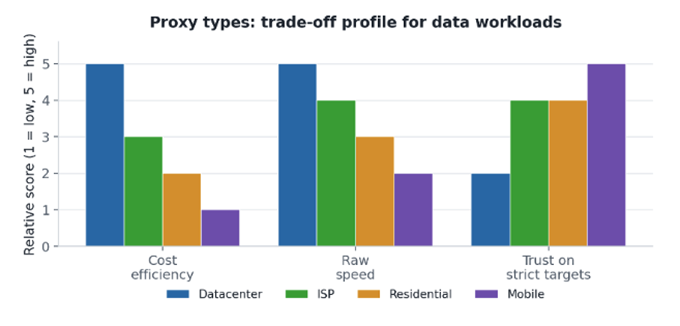
Illustrative profile based on typical behaviour across production data jobs – your mileage varies by target
Figure 1. Cost, speed and trust pull in different directions — the right proxy is the one that matches the job, not the highest bar.
How to choose: the criteria that actually predict success
Buying proxies without criteria is like choosing a database by its logo. Pick a proxy stack the way you would pick storage — on measurable behaviour under real conditions.
- Success rate under sustained load. A quick “it works” test proves nothing. What matters is the success rate held across thousands of requests over hours. Ask for, or measure, the rate at your actual concurrency.
- Session control. Some flows need a sticky IP for the duration of a task; others benefit from per-request rotation. You want both, configurable per job — not one global setting.
- Geotargeting depth. Country-level is table stakes. City- or ASN-level targeting is what separates “okay” from “surgical” when validating localized listings, prices, or ads.
- Protocol and tooling compatibility. Your connectors and scripts may rely on HTTP(S), SOCKS5, and specific authentication. Proxies that integrate cleanly save days of patching.
- Observability. Usage dashboards, per-IP stats, and responsive support turn “mystery downtime” into a solvable engineering problem.
On the supply side, the providers worth shortlisting expose all four IP types with country- and city-level targeting and HTTP(S)/SOCKS support under one roof. Proxys.io, for example, offers datacenter, ISP, residential and mobile pools across both common and long-tail locations, which makes it practical to A/B test proxy types against the same workload before committing budget.
Matching proxy type to data task
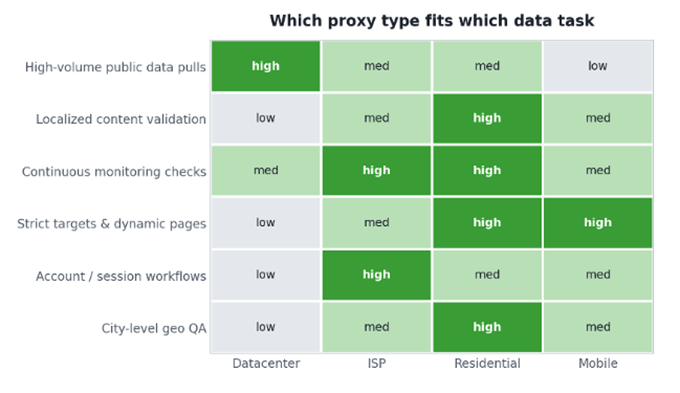
The fastest way to choose is to map the “personality” of the workflow to a proxy profile. Some jobs are sprinting through public data; others are tiptoeing across glass. The table and matrix below give you a starting point you can adapt.
| Data management task | Typical fit | Why it fits |
| High-volume public data pulls | Datacenter | Fast, cost-effective throughput where the target does not filter aggressively |
| Localized content validation | Residential / ISP | Consistent local viewpoints for prices, currency and layout |
| Continuous monitoring checks | ISP / Residential | Stable sessions with fewer disruptions across long runs |
| Strict targets & dynamic pages | Mobile / Residential | Higher reliability when the target filters automation hard |
| Account / session workflows | ISP | Strong performance with a persistent, normal-looking IP profile |
| City-level geo QA | Residential (geo-targeted) | Precise location control down to the city |
Figure 2. A fit matrix is easier to reason about than a single ranking — most tasks have two viable options, which is exactly what makes A/B testing worthwhile.
A real workflow: regional price and listing monitoring
To make this concrete, here is a monitoring pipeline shaped like ones we have run for competitive-price tracking and ad verification. The pattern generalizes to most collection jobs.
- Schedule and scope. An hourly job checks ~4,000 product URLs across three markets (US, Germany, Brazil). Each market is validated through geo-targeted residential IPs so currency and availability render correctly.
- Concurrency budget. From a single datacenter subnet, the same target stayed healthy up to roughly 50–60 requests/minute, then started returning interstitial pages above ~120. Splitting the load across a rotating residential pool kept the effective rate well above the 90% success floor (see Figure 3).
- Retry logic with limits. Exponential backoff (base 2s, factor 2, capped at 60s), a hard ceiling of 5 retries, and every final failure logged with URL, region, IP and HTTP status. Unlimited retries are just a self-inflicted denial-of-service.
- Content-level validation. A 200 response with an empty price node or a consent interstitial is still a data failure. The job asserts on the fields it cares about — price, currency symbol, stock state — not merely on the status code.
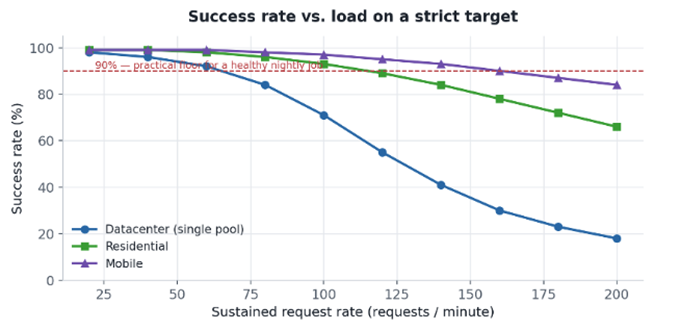
Figure 3. The same job, three proxy profiles. Datacenter is cheapest until the target starts filtering; below 90% success, retries pile up and the dataset drifts.
Lesson learned: the bottleneck is almost never raw speed — it is success rate at your real concurrency. We have repeatedly cut total job time by reducing per-IP request rate and widening the pool, because fewer retries beats faster failures every time.
Setup habits that keep pipelines clean
A proxy setup can be brilliant and still fail if it is wired badly. In data management the goal is not “make it work once” — it is predictable repeatability.
- Segment your pools. Different IP pools for different job types. Do not mix heavy collection with sensitive verification on the same IPs; reputation damage on one task quietly degrades the other.
- Rotate with intention. Rotate when it helps, keep sessions when a task requires continuity. Rotating on every request can fragment a dataset into inconsistent snapshots; never rotating invites throttling.
- Test geographically. A provider that is fast in one region can be unstable in another. If your datasets are global, benchmark in the regions that actually matter to them.
- Track quality, not just response codes. Build monitoring around the content you depend on. Connection metrics lie; field-level assertions do not.
Common mistakes (and what they cost)
- Buying on price alone. Cheap IPs are fine for low-risk volume, but for business-critical ingestion the cost of failed jobs and dirty data dwarfs the savings.
- Skipping compatibility checks. Some tools are picky about authentication, protocol, or IP format. Confirm clean integration before you scale, not after.
- Treating proxies as a one-time purchase. Targets change, routing changes, IP reputation drifts. Without ongoing observability you will be debugging blind in three months.
Build a proxy strategy, not a proxy purchase
The best proxies for data management tools in 2026 are not defined by a buzzword. They are defined by outcomes: stable pipelines, consistent datasets, fewer failed jobs, and clean monitoring signals.
Think like a systems builder. Match the proxy type to the task, segment your pools, rotate deliberately, validate content rather than connections, and watch performance over time. Done right, proxies become invisible infrastructure — quiet, dependable, and simply there when your workflows need to run.
Further reading on proxy types and configuration: https://proxys.io/en
