

Before I start this post – a quick announcement.
My business partner and pod cohost, Dr Jason Downs, is visiting the UK in late April. If you’d like to meet and chat with him about the products we have planned for On The Reg Team in 2026, shoot us an email to [email protected] with the subject line UK visit and he will get back to you. Thanks!
It’s 2026 folks! I see that thrift shops are being overwhelmed with donations as people clean out their closets over the summer break here in Australia.
Let’s face it, the cost of living is only going one way: thrift shops are thriving like never before. I’m certainly thrifting a lot more when it comes to my closet, which means I have added a lot to it…
I recently spent a weekend putting every outfit in the app Indyx and was a bit shocked at the total number of things I own:
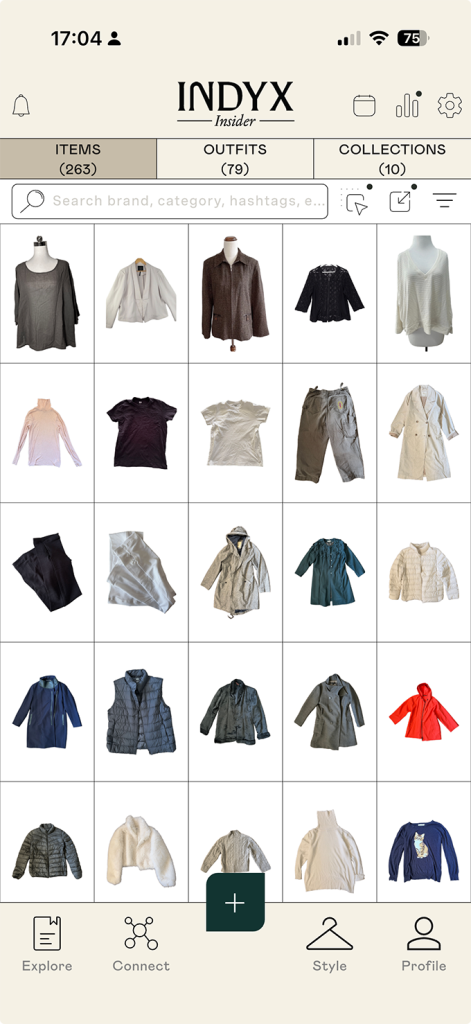
263 individual items?! Yikes! Data is revealing… I am going to try a ‘low buy’ year and see if I can reduce the amount through natural attrition.
Taking my cue from the ‘thrifting turn’ in my closet life, I am trying to also streamline my digital life. My main aim is to make it a bit less spendy.
Between my work needs, the business and my family subscriptions, I literally spend thousands of dollars on streaming services and platforms each year. I’m taking a couple of months off work unexpectedly at the moment, so it seems a good time to do a digital detox and see if I can slim down a bit by carefully considering what tools I really need.
With that aim in mind, here’s my honest (and highly opinionated) update on some of the apps and services which I think are the bare essentials for an academic life.
Obsidian – a flexible database, with a few quirks.
I don’t make the rules, but if I did, no one would be able to start their PhD without also installing some database software. Working academics need one too – just trust me on this. If you ever think “I know I wrote something about that but what the hell did I call it??”, you need a text database in your life.
My database is where I do all the un-glamorous bits of the thinking work: it collects and holds everything from scrappy notes to self, to half finished ethics approvals, to the final draft of that paper you sent off to peer review.
I still use the free-to-use database Obsidian. Obsidian is my ‘catch all’ place for writing. Basically it’s a markdown editor that acts like your own local version of wikipedia. I wrote a longer piece about it here and I have an example ‘coffee’ vault that might be helpful if you are setting up for academic work.
I’m a messy writer who starts and stops a lot – Obsidian is a great place to keep mess organised, as I wrote about here. If you want a cloud solution, have a look at Notion, but paying to maintain access to your notes is not ideal. You do pay a price in time though. As a piece of software, Obsidian does have a distinct 90s vibe. It needs to be installed and run locally and automated cloud back ups are tricky (I do mine for free in GitHub).
While you can go mad with Obsidian customisations, I’ve found most are more trouble than they are worth. Recently I stripped my tricked out Obsidian install back to bare basics; it still works well and requires less maintenance. So start small, and build more as you need to.
Microsoft 365 – the unsung hero?
I can hear you up the back: “what the actual fuck Inger?!”. MS Word, Excel… Fucking Teams?! Are you insane?
Hear me out. When you work with other people, collaboratively, in a large organisation, you need shared digital workspaces and Microsoft Teams does a bang-up job. There’s lots of tools in the 365 sack, and my institution pays for all of it. Not only do they pay for it – they also have to look after it. If I lose a file or need help, I have someone to call.
I’ve noticed that most university administrators, clever people all, have been on the Microsoft Teams band wagon for years. I only started using it in 2022, and now I wonder how I ever coped before. Have a look at the ‘planner’ plug in for a kanban style task board where you can track projects and share documents.
And, of course, with most installs of Microsoft 365 comes… Microsoft Copilot
I can hear the collective indrawn gasp of horror from here, but stay with me. If you need a bog standard AI helper, Copilot is… ok? I was really dismissive of it until I saw my computer science academic mates using it and decided to take a second look. Peer pressure is a funny thing, eh?
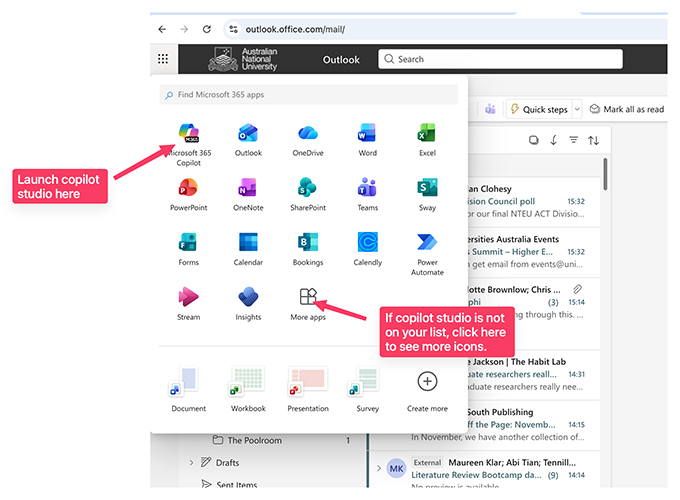
One of my barriers to entry was the way Copilot was presented on screen as only a chat window. You need to use the web interface to get to the ‘Copilot studio’ space to do serious work with it. Here’s a screen grab of how to find it via the web app under the dot menu, top left:
Copilot has similar functionality to ChatGPT but you know, microsoft styles, so just a bit shitty:
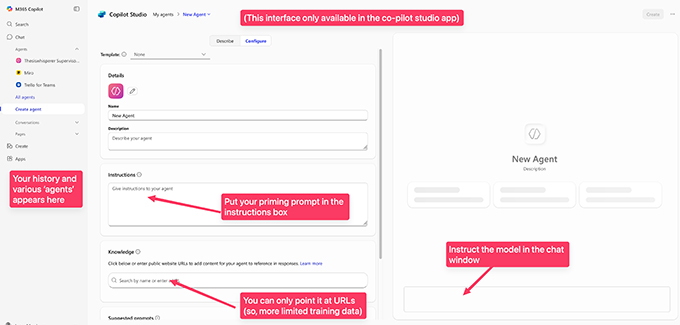
You will need to prime Copilot properly to get good results. Start a chat with setting the ‘character’ of your assistant (eg: “you are an expert academic writing editor”). Copilot is more limited than others in how many documents you can share and how it accesses the web. However, for bog standard admin writing you can’t be bothered doing, it does a reasonable job.
For instance, my university recently asked for my opinion on their change management processes. I had oh so many thoughts, most of them with NSFW words in them. So I used Copilot to generate more fit for public consumption responses. If management care to look at my chat logs, they will see what I really think … which is a good reminder about privacy. If your workplace supplies the digital tool, they can see what you do with it. Take that under advisement.
Pay your own money for ChatGPT if you want to keep your chats ‘private’. I’m not sure what is worse: your boss being able to see everything you talk to AI about, or Sam Altman.
TextExpander – a small spend but worth it.
TextExpander is my favourite kind of productivity tool: the sort that saves time without asking you to become a different person first. It’s about $40 USD a year, which is a small price to pay for the elegant efficiency of the tool.
Basically, TextExpander is a way of saving little bits of writing you type all the time, and deploying them into any program that takes text entry. Sounds simple and maybe a bit pointless, but think about it – typing takes time. Less time typing, more time doing other things. Also TextExpander ensures consistency. If you want your title, university name or elements in online courses to be capitalised the same way, TextExpander is the answer.
I love this software so much I even wrote a little self published book ‘ TextExpander for academics’ with my pod cohost and business partner Dr Jason Downs. It’s a practical “look book” of snippets for academic life—email sign-offs that hit the right tone, admin templates that stop you rewriting the same messages over and over, research comms you can customise in seconds, and for supervisors, feedback comments that help you be clear without being crushing.
The point isn’t to turn you into an efficiency machine; it’s to shave off the repetitive typing so you can spend your attention where it actually matters—thinking, teaching, writing, or just taking a proper lunch break. If you’ve ever stared at your screen thinking “I have written this exact email before”, you need TextExpander in your life.
Note: the security settings in some universities might prevent you from using TextExpander on a work machine, but it’s always worth pushing back. The company behind TextExpander are used to organisations being worried and have documentation prepared for committees. This documentation made it easy for me to go through the process with ANU to approve TextExpander for all staff and students (you’re welcome!).
Apple Notes or similar for catching ideas and weblinks.
Apple notes is one of those ‘comes with the phone’ apps that people often overlook. I did – for years – but now I have saved myself some serious money by replacing a couple of online platforms, including Readwise, with this humble app. My approach can be replicated on any similar app – ‘Alternative to’ has lots of suggestions for Android equivalents.
I organise my note taking system for speed first, tidiness second. When something comes up – an idea, a link, a photo, a half-formed insight – I capture it quickly in Notes and give it just enough structure to be findable later. Since I do 99% of my reading and scrolling on the phone, Apple Notes is the best way to keep links to webpages I want to come back to later.
Don’t overthink the filing. If I know what the item is for, I’ll tag it (or drop it into a relevant folder for that area of my work or life); if I don’t, it goes into an ‘inbox’ for sorting later. Over time, smart folders and tags do the heavy lifting; turning a messy stream of capture into a working library I can actually retrieve from, without pretending I have the time (or temperament) to file everything perfectly in the moment.
To copy this approach, start by giving yourself permission to prioritise capture over categorising. Create one obvious “inbox” note or folder and use it as the default landing spot whenever you don’t have time to decide where something belongs. Then add a small set of broad folders for stable parts of your life and work (e.g., Work, Home, Writing, Admin), and rely on tags for everything that cuts across categories (projects, themes, people, recurring topics like #AI). The trick is to tag lightly at the moment of capture – one or two tags is plenty – and let smart folders surface collections automatically, rather than trying to build a perfect tree.
Finally, set a tiny, low-drama maintenance habit: once a week (or whenever you’re waiting for a bus or a meeting to start), skim the inbox and rename anything cryptic. Add a tag if it needs one, and delete only the items that are clearly not “keepers”. The goal isn’t a beautiful archive; it’s a system that stays usable while you’re busy.
Zotero – a low cost, portable academic library
Zotero is a genuinely free/low-cost way to build a durable personal library of academic PDFs, notes, and citations that doesn’t evaporate the moment you hand back your university login. I know, I know – I spent a bit of time above saying that you should use Microsoft 365 tools, but I think your databases are different because they contain a lot of your own IP. It isn’t that EndNote is “bad” — it’s that it’s frequently institutionally entangled: licences, managed installs, restricted cloud syncing, and a long tail of friction when you move away to another institution, which most of us do over time.
Zotero is designed to travel through your academic life with you. Your library sits under your control, you can sync across devices, and you can keep the same citation manager through PhD → postdoc → industry/consulting/whatever comes next without a costly migration project (at exactly the moment you have the least spare cognitive bandwidth).
The trick to organising Zotero, I’ve found, is to have a small number of broad collections by topic/role (e.g., Gen AI, Methods, Neurodiversity, Teaching & Learning, Writing, Universities). Here’s a screen shot of my library:
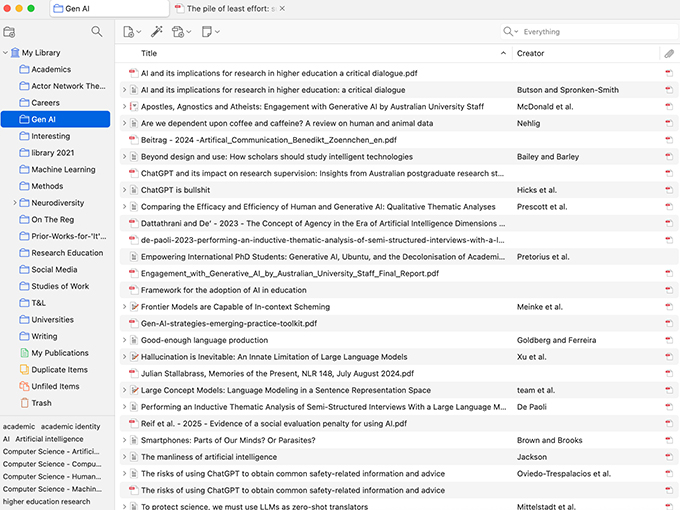
Zotero gives you the ability to tag across categories (so “academic identity” or “AI” can cut through multiple folders without duplicating items). I strive for a practical, retrieval-first approach: collections help me browse a domain, while tags let me slice the same set of papers different ways depending on what I’m writing or teaching.
The payoff of using Zotero is compounding: once you’ve built the habit of saving and tagging as you read, you end up with a portable, searchable knowledge base that supports your next paper, your next chapter, and your next job. Zotero on the web is a small cost upgrade that will enable you to back up, share and plug your library into various AI tools – but it works just as well as a free install on your machine.
I could go on, but I won’t
You get the idea I hope. I’m trying to apply the same logic as the thrift-shop clean-out to my digital life: pay attention to cost and sustainability. Some digital tools are worth the money because they genuinely reduce friction (or because the institution carries the cost and the risk); others are just shiny subscriptions that quietly drain your budget and your attention. If you’re doing a PhD, or even just tired of digital clutter, run an eye over your digital subscriptions with an eye to portability and “future you”. Look for long term good investments that will travel with you, ditch the rest. It’s ok for your systems be practical rather than perfect.
